
Index
What is URL?
Anatomy of URL
How many parameters can be passed in URL?
When should you use POST instead of GET?
Conclusion
What is URL?
A URL (Uniform Resource Locator) is essentially the address of a resource on the internet. Just like a street address helps you find a physical location, a URL helps your browser locate and retrieve web resources.
Consider this example: when you type https://example.com/products?category=shoes into your browser, you’re telling the internet exactly where to find the shoes category on example.com.
Key purposes of URLs:
Locate resources on the web (pages, images, APIs)
Provide a standard way to access information
Enable linking and bookmarking
Pass data between client and server
Anatomy of URL
Understanding URL structure is crucial for both frontend and backend development. Let’s examine a complete URL:
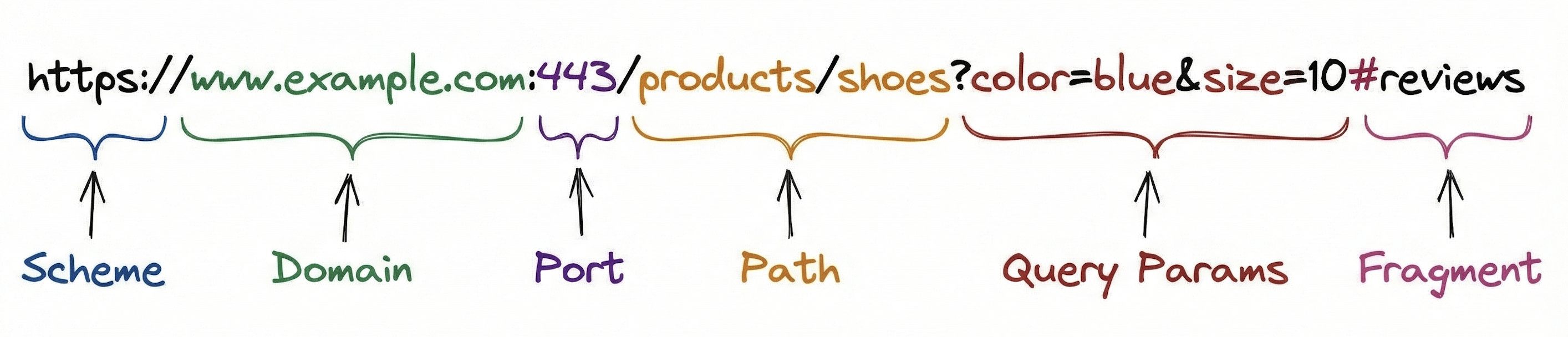
1. Scheme (Protocol)
The scheme tells the browser which protocol to use.
https://    → Secure HTTP (encrypted)
http://     → HTTP (not encrypted)
ftp://      → File Transfer Protocol
mailto:     → Email protocol
Always use HTTPS for any application handling user data. It encrypts the entire request, including URL parameters.
2. Domain (Host)
The domain identifies which server to contact.
www.example.com
└┬┘ └──┬──┘ └┬┘
 │     │     └── Top-Level Domain (TLD)
 │     └── Domain name
 └── Subdomain
Common examples:
api.example.com- API subdomainblog.example.com- Blog subdomain192.168.1.1- Direct IP address (less common)
3. Port (Optional)
Ports specify which service on the server to connect to.
Default ports (usually hidden):
HTTP: Port 80
HTTPS: Port 443
Custom ports (must be specified):
Development:
:3000,:8080Database:
:5432(PostgreSQL),:27017(MongoDB)
Example: http://localhost:3000/api/users
4. Path
The path identifies the specific resource on the server.
/products/shoes/nike-air-max
└───┬───┘ └─┬─┘ └─────┬─────┘
Category  Type   Specific item
RESTful design example:
/users              → List all users
/users/123          → Get user with ID 123
/users/123/orders   → Get orders for user 123
5. Query Parameters (?)
Query parameters pass data to the server as key-value pairs.
?color=blue&size=10&brand=nike
 └───┬───┘ └──┬──┘ └────┬────┘
  Key=Value   Key=Value  Key=Value
Structure:
Starts with
?Key-value pairs separated by
&Format:
key=valueMust be URL-encoded for special characters
Common uses:
Filtering:
?category=electronicsSorting:
?sort=price&order=ascPagination:
?page=2&limit=20Search:
?q=laptop&brand=dell
6. Fragment (Anchor)
The fragment identifies a specific section within the page.
#reviews
#section-3
#top
Important: Fragments are NOT sent to the server. They’re handled entirely by the browser for client-side navigation.
How Many Parameters Can Be Passed in URL?
Understanding URL parameter limits requires examining multiple factors. The answer isn’t straightforward because browser capabilities, server configurations, and network infrastructure all impose different constraints.
Browser Limits
Different browsers impose different maximum URL lengths:
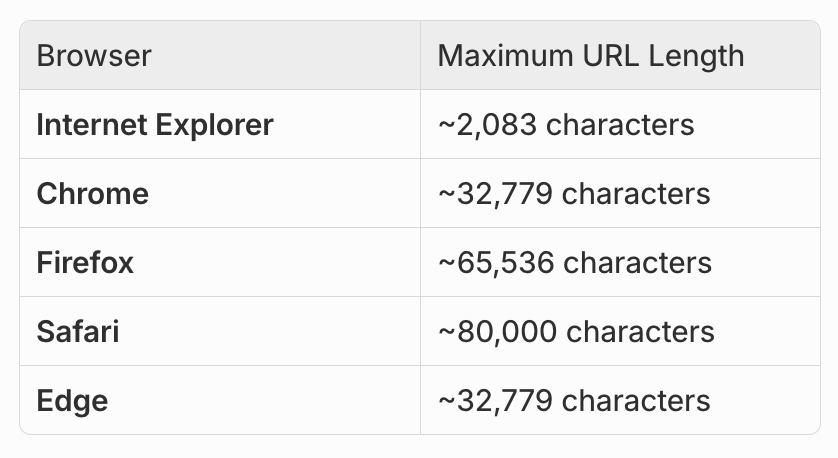
Note: While Internet Explorer has been discontinued, its 2,083 character limit remains relevant for legacy systems and corporate environments that may still enforce these constraints.
Server Limits
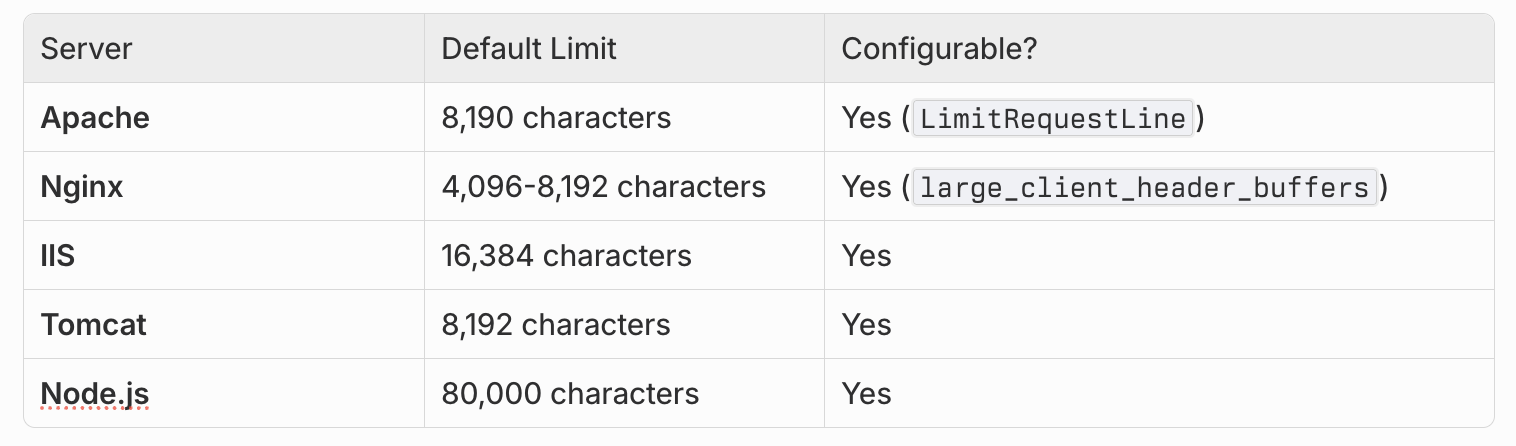
Your server also has URL length restrictions:
The Practical Recommendation
Keep URLs under 2,000 characters for maximum compatibility.
This conservative limit ensures your URLs work across:
All browsers (even older ones)
All common server configurations
Corporate proxies and firewalls
Mobile devices with limited resources
Real-World Calculation
Let’s calculate how many parameters fit in 2,000 characters:
// Base URL
https://api.example.com/search                    // 30 characters

// Parameters (assuming average 15 chars per param)
?category=electronics                              // 21 characters
&brand=samsung                                     // 14 characters
&price_min=100                                     // 14 characters
&price_max=1000                                    // 15 characters
&rating=4                                          // 9 characters
&in_stock=true                                     // 14 characters
...

// Rough estimate: 100-150 parameters (with short values)
// But realistically: Stick to 10-20 parameters maximum
What Happens When You Exceed the Limit?
414 URI Too Long Error:
HTTP/1.1 414 Request-URI Too Long
Content-Type: text/html

<html>
<head><title>414 Request-URI Too Long</title></head>
<body>
<h1>414 Request-URI Too Long</h1>
The requested URL's length exceeds the capacity limit for this server.
</body>
</html>
Other possible outcomes:
Silent truncation (server cuts off the URL)
Request fails without error message
Unpredictable behavior (some params missing)
Connection timeout
Testing URL length in JavaScript:
const url = new URL('https://example.com/search?category=electronics&brand=apple');
console.log('URL length:', url.href.length);

if (url.href.length > 2000) {
  console.warn('URL too long - Consider using POST.');
}
Server Configuration Limits
Some servers limit the NUMBER of parameters separately from URL length:
Node.js/Express:
app.use(express.urlencoded({
  extended: true,
  parameterLimit: 1000  // Default: 1000 parameters
}));
Will URL Parameters Increase Delay to the Server?
This is a crucial question for performance-conscious developers. Let’s break down the actual performance implications.
The Short Answer
URL parameters add minimal latency (typically microseconds), but they have other performance implications worth understanding.
Performance Impact Analysis
1. Network Latency (Negligible)
URL parameters are sent in the HTTP request headers, which are transmitted in the first TCP packet.
Typical impact:
- Short URL (500 chars):   ~0 ms additional delay
- Medium URL (1500 chars): ~0.001-0.01 ms additional delay
- Long URL (2000 chars):   ~0.01-0.1 ms additional delay
Why so minimal?
Headers are small compared to typical response bodies
Modern networks can handle several KB in a single packet
The TCP handshake time (20-100ms) dwarfs URL transmission time
2. Server Parsing Overhead (Minimal)
Modern servers are highly optimized for parsing URLs and query parameters.
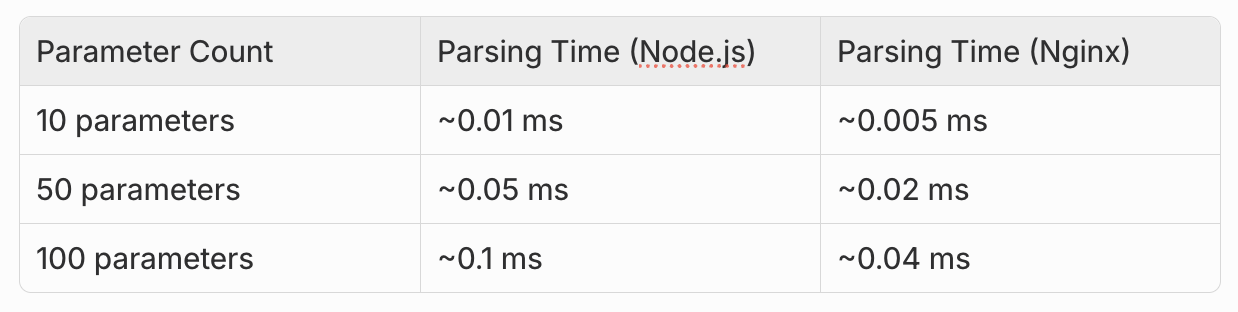
To provide perspective, database queries typically take 5-50ms, making URL parsing negligible in comparison.
3. Caching Benefits (Significant Performance Gain)
This is where GET requests with URL parameters provide substantial advantages:
GET requests with URL parameters:
Cacheable by browsers
Cacheable by CDNs
Cacheable by proxy servers
Can be bookmarked and shared
POST requests:
Not cached by default
Require server processing every time
Cannot be bookmarked
Real-world example:
// Cacheable GET request
GET /api/products?category=shoes&brand=nike
// First request: 200ms (server processing)
// Subsequent requests: 5ms (served from cache)

// Non-cacheable POST request
POST /api/products
Body: { category: "shoes", brand: "nike" }
// Every request: 200ms (server processing required)
4. Logging and Analytics Impact
URLs with parameters can impact logging systems:
Concerns:
Large URLs consume more storage in log files
Query parameters appear in access logs (security consideration)
Can bloat analytics databases
Example log entry:
[2026-01-19] GET /search?query=laptop&brand=dell&price_min=500&price_max=1000&rating=4&color=black HTTP/1.1Each request with many parameters takes more storage space.
When URL Length Actually Affects Performance
1. Corporate Proxies and Firewalls
Many corporate networks have strict URL length limits (often 1024-2048 characters):
Can cause silent failures
May require multiple roundtrips
Can trigger security alerts
2. Mobile Networks
While modern mobile networks handle URLs well, there are considerations:
Older 3G networks may have stricter limits
High latency amplifies any overhead
Data usage for repeated long URLs
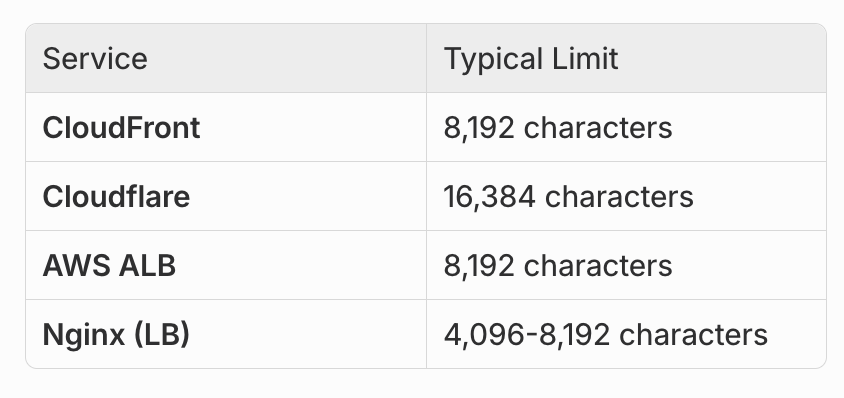
3. CDN and Load Balancer Limits
Some CDNs and load balancers have conservative URL limits:
When Should You Use POST Instead of GET?
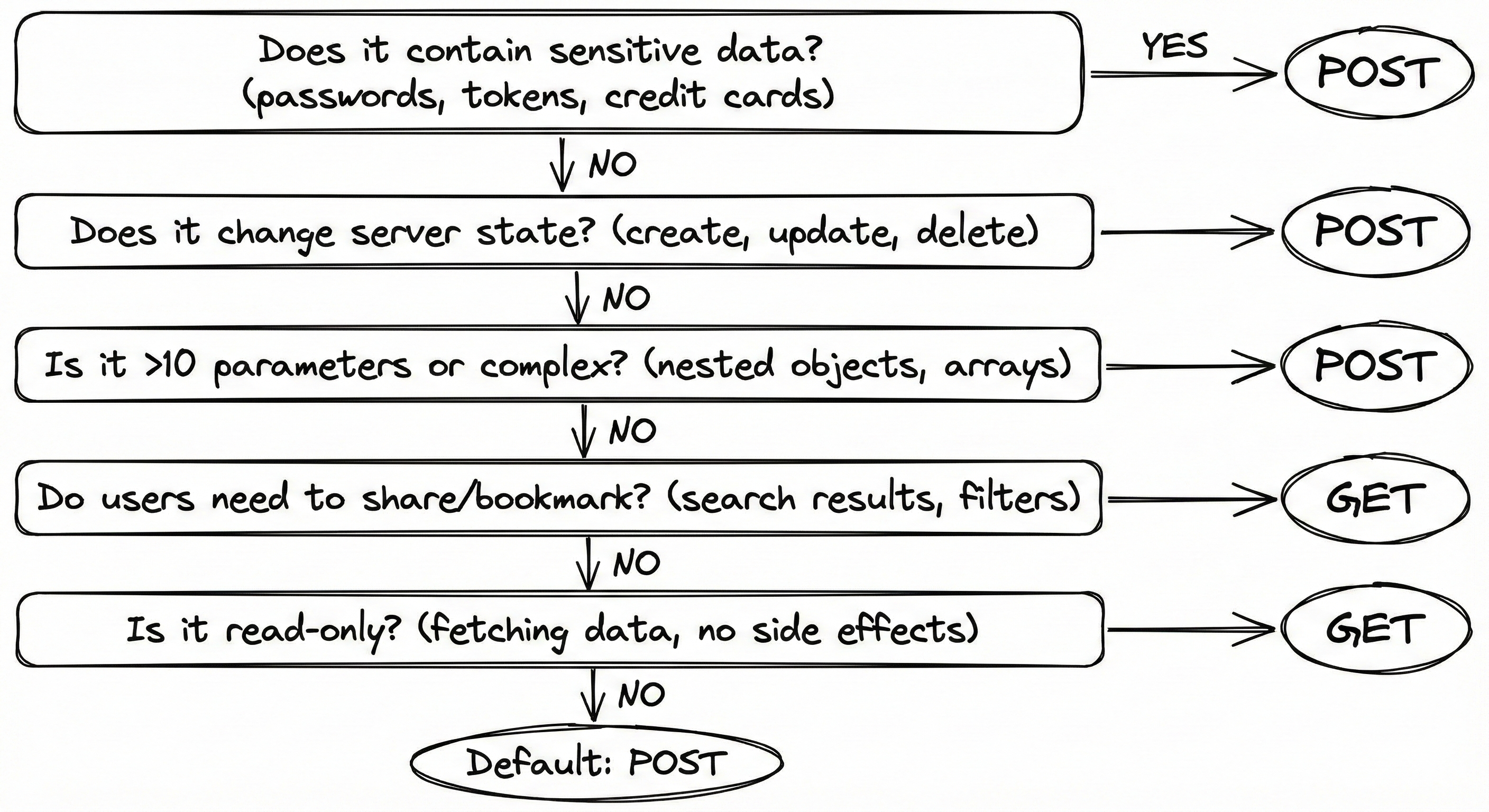
This is the critical question that determines API design quality. Let’s examine a comprehensive decision framework.
When to Use GET (URL Parameters)
Use GET requests with URL parameters when:
Reading/Retrieving Data - The operation doesn’t modify server state (searching, filtering, fetching).
Idempotent Operations - Multiple identical requests produce the same result without side effects.
Cacheable Results - You want browsers, CDNs, and proxies to cache responses for better performance.
Bookmarkable/Shareable - Users should be able to bookmark or share the exact query (search results, filtered lists).
Small Data Payload - Parameters are few and values are short (under 1,500 characters total).
Non-Sensitive Data - Information that’s safe to appear in browser history and server logs.
// Good GET examples
GET /api/products?category=laptops&price_max=1000&sort=rating
GET /api/users/123
GET /api/search?q=javascript&page=2
When to Use POST (Request Body)
Switch to POST when you encounter any of these scenarios:
Sensitive Data - Passwords, credit cards, personal information, API keys, tokens. These should NEVER appear in URLs as they get logged everywhere.
// Incorrect approach:
GET /api/login?username=john&password=secret123

// Recommended approach:
POST /api/login
Body: { "username": "john", "password": "secret123" }
Large Data Payload - When approaching 1,500+ characters or sending complex nested objects, arrays, or file uploads.
// Complex filter object - use POST
POST /api/products/search
Body: {
  "filters": {
    "categories": ["electronics", "computers", "laptops"],
    "brands": ["Dell", "HP", "Lenovo", "Apple"],
    "price": { "min": 500, "max": 2000 },
    "specs": {
      "ram": ["16GB", "32GB"],
      "storage": ["512GB SSD", "1TB SSD"]
    }
  },
  "sort": { "field": "price", "order": "asc" }
}
Modifying Data - Creating, updating, or deleting resources (non-idempotent operations).
// Creating or modifying data - always POST/PUT/DELETE
POST /api/users
Body: { "name": "John", "email": "john@example.com" }

PUT /api/users/123
Body: { "name": "John Updated" }

DELETE /api/users/123
Many Parameters - More than 10-15 parameters, especially with long values.
Binary Data - Uploading files, images, documents.
POST /api/upload
Body: FormData with file attachment
Security Requirements - Operations that modify state or require authentication tokens in the body.
Common Mistakes to Avoid
Using GET for mutations:
// Incorrect approach:
GET /api/users/123/delete
GET /api/cart/add?productId=456
Putting sensitive data in URLs:
// Incorrect - Password visible in logs:
GET /api/auth?username=john&password=secret

// Incorrect - Credit card in URL:
GET /api/payment?card=4532-1234-5678-9010
Sending complex objects via GET:
// Incorrect - URL-encoded JSON reduces readability:
GET /api/search?filters=%7B%22category%22%3A%5B%22electronics%22%5D%7D
Real-World Example: Search Implementation
Simple Search - Use GET:
// Few parameters, cacheable, shareable
GET /api/products?q=laptop&category=electronics&maxPrice=1000
Advanced Search - Use POST:
// Many filters, complex structure
POST /api/products/advanced-search
Body: {
  "query": "laptop",
  "filters": {
    "categories": ["electronics", "computers"],
    "price": { "min": 500, "max": 2000 },
    "brands": ["Dell", "HP", "Lenovo"],
    "specs": {
      "ram": ["16GB", "32GB"],
      "processor": ["Intel i7", "AMD Ryzen 7"]
    },
    "ratings": { "min": 4.0 }
  },
  "sort": { "field": "price", "order": "asc" },
  "pagination": { "page": 1, "limit": 20 }
}
Conclusion
Understanding URL parameters and when to switch to POST requests isn’t just about technical limits—it’s about building secure, performant, and user-friendly applications.
The choice between GET and POST isn’t just technical—it impacts user experience, security, performance, and SEO. By understanding these principles, you can design APIs that are both efficient and secure.
The Simple Decision Rule
“Would I want this URL in my browser history? If no, use POST.”
This single question will guide you to the right decision in most cases.
When in doubt, err on the side of security and use POST for anything sensitive. The slight loss in caching benefits is worth the peace of mind.