A pull request tells you what changed in the code. A release note has to explain what changed for the person using the product. Getting from one to the other takes real work: finding the relevant changes, checking what actually shipped, understanding the impact, and deciding what deserves a mention.
That is a useful place to introduce an AI workflow. The inputs are inspectable. The result is small enough to review. And a mistake has a clear shape: an unsupported claim, a missing change, or a feature described as available before it reaches users.
The rule this guide follows is simple: an AI workflow should make the finished work easier to check. A polished paragraph that sends you back through every pull request has moved the work around.
This guide builds one repeatable workflow, from a release comparison to a draft ready for human review. The checkout example below is fictional and deliberately small; it illustrates the method, rather than reporting a production experiment or measured time savings.
The starting inspiration was Iron Giant’s guide to delegating recurring work to AI agents. Here, I want to apply that idea to a specific engineering problem: producing release notes whose claims we can trace back to evidence.
Choose a job with a finish line
“Help with our release” leaves too many decisions implicit. Does that include testing? Deployment? Customer emails? Start by defining one deliverable: an internal release brief with a proposed public summary.
Separate the two audiences. The internal brief needs source references, rollout questions, and omissions. The public summary needs clear language about changes relevant to its readers. Keeping both in one review packet makes it easier to check the public wording without publishing internal details.
Prepare a release review packet for the release range I provide.

Return:
1. A proposed public summary of confirmed user-visible changes.
2. An internal evidence list supporting each proposed bullet.
3. Items excluded from the summary, with reasons.
4. Questions that must be resolved before publication.

Use only the supplied or explicitly approved sources.
Keep the result as a draft. Do not publish or modify source records.
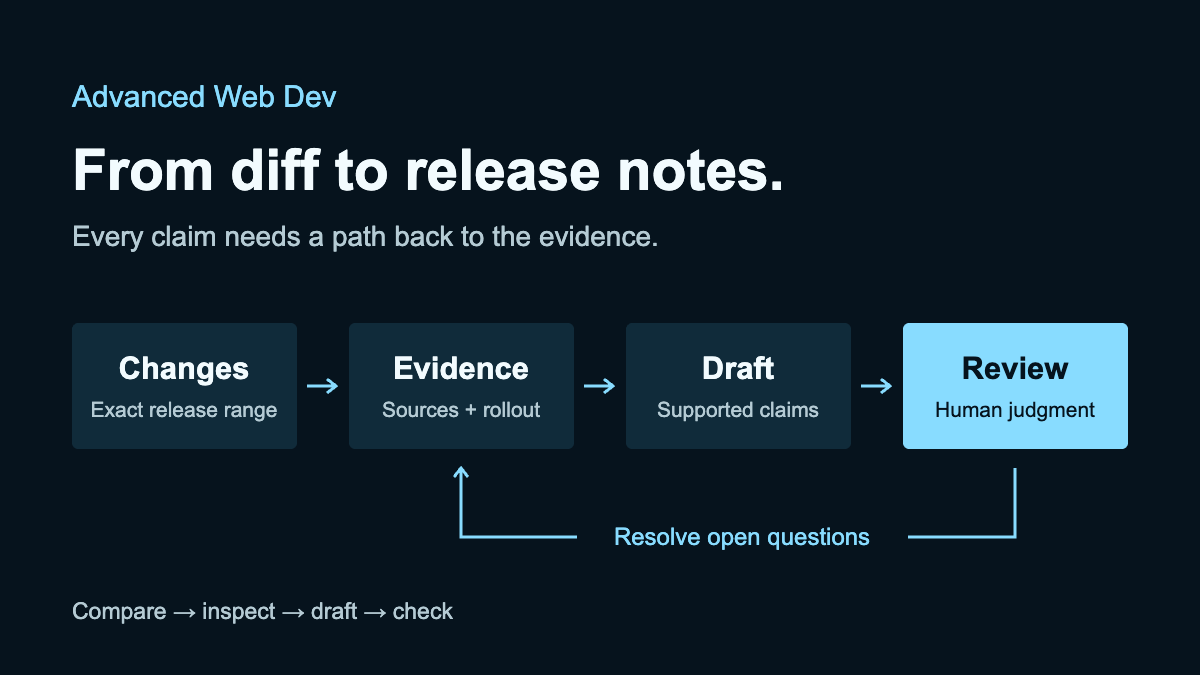
For this workflow, “done” means a reviewer can follow each proposed bullet to its evidence and see what still needs a decision. Bullet count doesn't matter. Some releases need only one.
Define the release range
Before asking a model to summarize anything, establish which two versions you are comparing. “Everything merged this week” can include work that missed the release, was reverted, or belongs to another service.
If your repository uses release tags, a starting point is:
git diff --stat v2.4.0 v2.5.0
git diff v2.4.0 v2.5.0 -- src/checkout/
These example tag names must be replaced with the actual release boundaries. The first command gives a summary of changed files; the second shows the full diff between the two tags, limited to src/checkout/. Git documents this as a comparison between two commits. It does not establish where either version is deployed.
The directory filter is useful for inspecting one area. It is not a complete release inventory: shared code, configuration, backend changes, and migrations may affect the same feature.
Record the resolved commit IDs, the relevant repository or service, and the deployment environment in the packet. A tag comparison defines the code boundary. Deployment records and feature configuration establish availability.
Assemble a small evidence packet
Give the workflow the material it needs to answer the assignment. For a release brief, that usually means the comparison, relevant pull requests, acceptance criteria, and rollout information. Add test results where they support a specific claim.
In my article about folder structure, I discussed how organizing related code makes context easier to find. The same principle applies here: keep the change and the evidence needed to explain it together.
Consider this fictional checkout release. These are sample source records, not links to real pull requests:
- PR #418: adds a pending state to the payment button and disables another click while the request is in progress.
- Test report T-27: verifies that two rapid clicks produce one request while the button is pending.
- PR #421: adds address autocomplete behind a feature flag.
- Rollout record R-12: the candidate version is deployed, but address autocomplete remains disabled for customers.
- PR #425: renames an internal analytics helper without an intended user-visible change.
In a real packet, give each record a working URL or an identifiable file path and revision. If the agent cannot open a source, it should say so. A link that looks plausible is not evidence that the source was read.
Extract claims before writing prose
Ask for the facts first. This gives you a compact checkpoint before the model starts smoothing uncertainty into confident sentences.
For each change, extract:
- The observed behavior before and after the change.
- The source supporting that description.
- The users or environments affected, if known.
- Deployment and feature-flag status, if known.
- What the available evidence does not establish.

Separate direct evidence from inference.
Do not turn a missing rollout record into a claim of availability.
Do not infer a performance or business outcome from a PR title.
For PR #418, the evidence supports a narrow statement about repeated clicks while a payment request is pending. It does not establish that the entire payment system prevents duplicate charges. That broader claim would require evidence about behavior beyond the button, including other request paths and retries.
For PR #421, implementation and customer availability are separate facts. The feature belongs in the internal packet, with its flag status attached. It should not appear as generally available in the public summary.
Review what the draft actually promises
Here is an illustrative weak draft for that packet. It is constructed to show common reasoning errors; it is not captured output from a model run.
Checkout is now faster and prevents duplicate payments. Customers can also use our new address autocomplete.
Every sentence creates a problem. There is no timing measurement supporting “faster.” The click guard does not prove duplicate-payment prevention across the system. The autocomplete feature is disabled.
A more defensible draft would be:
The checkout payment button now ignores additional clicks while a payment request is in progress.
The internal evidence entry should point to PR #418, test report T-27, and the rollout record. PR #421 stays in the exclusions list until availability is confirmed. PR #425 can be omitted from a customer-facing summary because this packet establishes no user-visible change.
A sentence can be grammatically excellent and still promise behavior the system does not provide.
Save the method with its checks
Once you have reviewed an output, capture the correction as a reusable rule. “Make the writing better” is difficult to apply consistently. “Keep each claim within the scope of its supporting evidence” gives the next run something concrete to do.
Save a plain-text instruction file alongside the workflow documentation. If your tool supports saved skills or reusable tasks, you can place the same instructions there. The format is less important than being able to read, version, and revise the method.
Release brief workflow

Inputs: exact release boundaries, relevant changes, supporting
issues or tests, and deployment or rollout records.

Method:
1. Confirm the range and report inaccessible inputs.
2. Extract behavior changes and attach source references.
3. Separate implemented changes from confirmed availability.
4. Draft the public summary using supported claims only.
5. List exclusions and unresolved questions for the reviewer.
6. Check every draft bullet against its cited evidence.

Completion checks:
- No unsupported availability, speed, or business claims.
- Every public bullet has an internal evidence entry.
- Private links and internal details stay out of public copy.
- Missing information remains visible.
- The packet remains a draft until the reviewer approves it.
These instructions describe expected behavior; they do not enforce permissions. Configure the tool’s actual access separately. A workflow that only reads source material and writes a draft does not need release-publishing credentials.
Try it on another release
A useful first draft proves that the workflow can handle one example. Try different inputs before making it a recurring responsibility.
Choose a second release with an awkward case: a reverted feature, an inaccessible issue, a change that requires customer action, or no customer-visible changes at all. Write down what you expect the workflow to do before running it.
- Reverted feature: check the final state before describing it as included.
- Missing issue: flag the gap and avoid inventing its acceptance criteria.
- Required migration: surface the action and its supporting documentation.
- No visible changes: allow an empty public summary with an explanation.
Then inspect the packet against those expectations. If the workflow keeps making the same mistake, revise the input requirements or instructions and rerun the relevant case. If the assignment is unclear, fix the instructions before adding another agent.
Add automation when the method holds up
A release-triggered run is often a better fit than a daily schedule for this job. The right trigger depends on your process: a release candidate, an approved deployment, or a request from the release owner.
Keep a record of the repository, compared commit IDs, environment, instruction version, and output location for each run. This lets you tell whether a packet is current and whether two runs describe the same release.
If a run fails halfway through, retain the partial result with its status. If you rerun it, update the draft for that release or label the new revision clearly. Avoid generating several apparently final packets that a reviewer has to reconcile.
Use the scheduling or event integration your chosen tool actually supports. This guide does not assume that every AI app can watch repositories, retain sessions, or run while your computer is closed.
Give the final result one owner
One agent may be enough for this workflow. Split the work only when the responsibility is substantial enough to justify a separate handoff.
For a larger release, one role could assemble the changes, another check rollout evidence, and a final editor assemble the packet. Every handoff should carry the source references and unresolved questions. Otherwise, the next role receives a summary with no reliable way to examine it.
A second agent agreeing with the first is not independent evidence. Both may be repeating the same unsupported interpretation. The final reviewer still needs to compare important claims with the underlying records.
Keep responsibility for the assembled packet explicit. Someone must resolve conflicting wording, remove duplicates, and decide which questions block publication.
Measure the work left for you
Evaluate the workflow on the effort required to reach an acceptable result. Drafting speed is only one part of that calculation.
Time saved = manual preparation time
           - (input preparation + review + corrections)

Track initial setup and ongoing maintenance separately.
Compare releases of similar complexity, and include time spent finding missing context. If you have not measured a manual baseline, report the observed preparation and review effort without claiming a percentage improvement.
Also track quality: unsupported claims, missed changes, unresolved availability questions, and whether the reviewer used the packet. A workflow can produce a short draft quickly while creating expensive review work.
There is a simpler baseline worth trying. GitHub’s generated release notes already provide merged pull requests, contributors, and a changelog link, with configurable categories. If that meets your audience’s needs, use it. Add an AI step when interpreting behavior and assembling evidence justifies the additional review.
Start with the next release
Take one completed release and reconstruct its brief from the material you already have. Define the range, collect the evidence, generate a draft, and mark every sentence you have to correct. Those corrections will tell you what the workflow needs.
The artifact to aim for is modest: a concise summary, traceable evidence, and an honest list of questions. That is enough to make the next review easier, and enough to find out whether this job is worth repeating with AI.